Getting your material in
Everything the stack knows starts as a file in _inbox/. This page is how things get there — out of your mail, your document drive, your chat apps, your call recordings — without you retyping any of it.
There are three routes. The first works for everything and needs no setup; the other two save time once you know what you are doing.
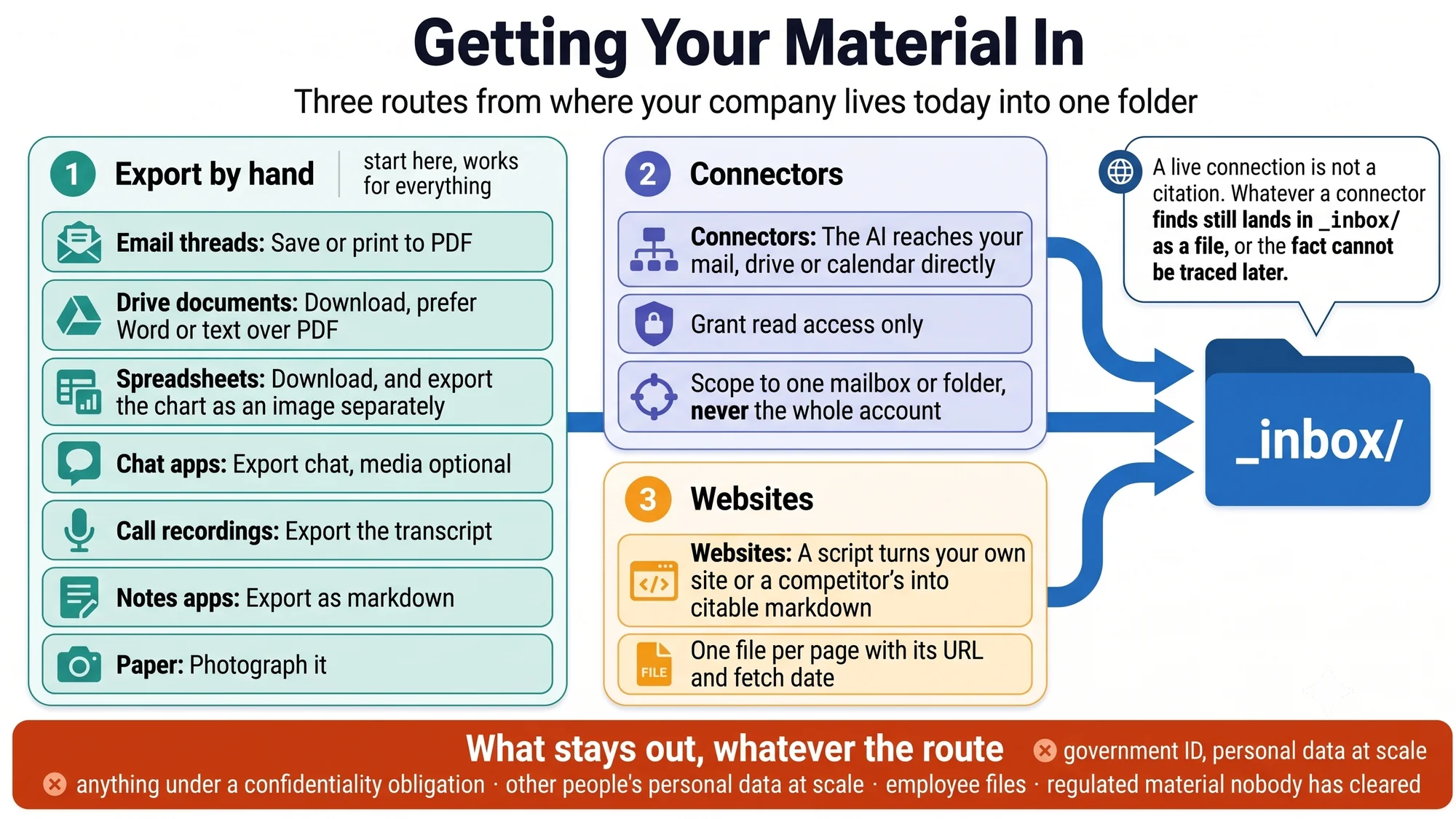
Route 1 — export by hand
The default, and the one to use for your first hour. Every system you already use has a way to get a document out of it. You do not need the perfect format — text is better than PDF, and PDF is better than nothing.
| Where it lives | How to get it out | What lands in _inbox/ |
|---|---|---|
| Email threads | Most mail apps can save a message or print a thread to PDF. For a long negotiation, one thread is one file. | 2026-07-24-supplier-negotiation.pdf |
| Documents in a drive | Download each one. Choose Word or plain text over PDF where offered — text is cheaper for the AI to read. | business-plan-v3.docx |
| Spreadsheets | Download as a spreadsheet or CSV. If a chart matters, also export the chart as an image — text extraction reads the words around a graph and misses the numbers in it. | projections.xlsx, growth-chart.png |
| Chat apps | WhatsApp and similar have an export-chat function, usually per conversation, with or without media. Without is fine. | whatsapp-distributor-chat.txt |
| Call recordings | Export the transcript from whatever recorded it. Transcripts are the single highest-value input the stack can get — what people actually said, not what a deck claims. | 2026-07-20-customer-call.txt |
| Notes apps | Most export as markdown or plain text. Markdown is this repo's native format — it drops straight in. | product-ideas.md |
| Your website | See Route 3. | websites/yourcompany.com/ |
| Paper | Photograph it. Ask the AI to read the picture. | signed-supplier-quote.jpg |
Two habits that pay off immediately:
- Name files for what they are, with a date where one matters.
2026-07-24-customer-call.txtbeatsUntitled(3).txtevery time the AI routes through the folder. - Do not sort, clean or summarise before you drop it in. Sorting is the AI's job. A messy inbox with everything in it beats a tidy one missing half the company.
Route 2 — connectors, for mail and drive
A connector lets your AI tool reach your mail, your document drive or your calendar directly, so you can say "find the supplier thread from March" instead of hunting for it yourself. What a connector is, and the standard underneath it, is covered in what-things-are.md; the safety habits are in ai-basics.md.
Setting one up is roughly the same in every tool: find the connectors or integrations section in your AI tool's settings, switch on the one you want, and authorise it against your account. Grant read access only to begin with, and scope it to the one mailbox or folder the task needs — not the whole account. If your company has a policy on connected tools, that conversation happens first.
One rule keeps the stack auditable: what a connector finds still lands in _inbox/ as a file. A live connection is not a citation. AGENTS.md requires every fact in the stack to trace to a source that can be opened later — and a search you ran once, in a chat that scrolled away, cannot be. So the working pattern is:
Search my mail for the thread with [supplier] from March about pricing.
Save what you find into _inbox/ as one markdown file: date, who said
what, and any figures quoted — with a note saying which mailbox it came
from and when you pulled it.
Where connectors genuinely beat exporting by hand: searching a large mailbox for something you half-remember, and recurring pulls — the weekly recap reading your calendar, or meeting-to-actions picking up a transcript as soon as the call ends.
Where they do not: your first hour. Exporting ten documents by hand is faster than setting up a connector, and the bootstrap needs files, not access.
Route 3 — websites
Your own site and your competitors' sites are high-value input and tedious to copy by hand. tools/scrape-site.mjs fetches a site into _inbox/ as citable markdown — one file per page, each carrying its URL and fetch date:
node tools/scrape-site.mjs https://example.comscraping.md covers the flags, what breaks, and — the part that matters — what not to scrape. Or skip the tool entirely: open the pages in a browser and save them into _inbox/ by hand. Same result, more clicking.
What stays out
The inbox is git-ignored, but it is still a folder an AI reads. Three things do not go in, whatever the route:
- Anything marked restricted — personal data, unsigned agreements, anything under a confidentiality obligation. See the sensitivity rules in AGENTS.md.
- Other people's personal data beyond what ordinary business records already contain. Researching a company is fine; harvesting its people is not.
- Regulated material — health, financial-account, legal-privilege — until someone has answered whether it may be processed at all. safety.md is the page to read before widening access.
Where it goes from here
Once the inbox has material in it, the bootstrap prompt reads everything and writes the ten sections of the stack, tagging every fact as confirmed, unverified or missing. After that, the inbox never closes: every new call transcript, quote and thread goes in, and the refresh prompt folds it into the stack without flattening your corrections.
QUICKSTART.md walks the whole first hour in order.
Generated from docs/getting-material-in.md in the repository. Edit the markdown, not this page.