Safety — giving an AI access to your files
Handing an AI the keys to your folders is powerful, and it is exactly where things go wrong. Used with a few guardrails it is safe. Used carelessly, a file can be deleted and gone for good.
Read this before you run the bootstrap prompt.
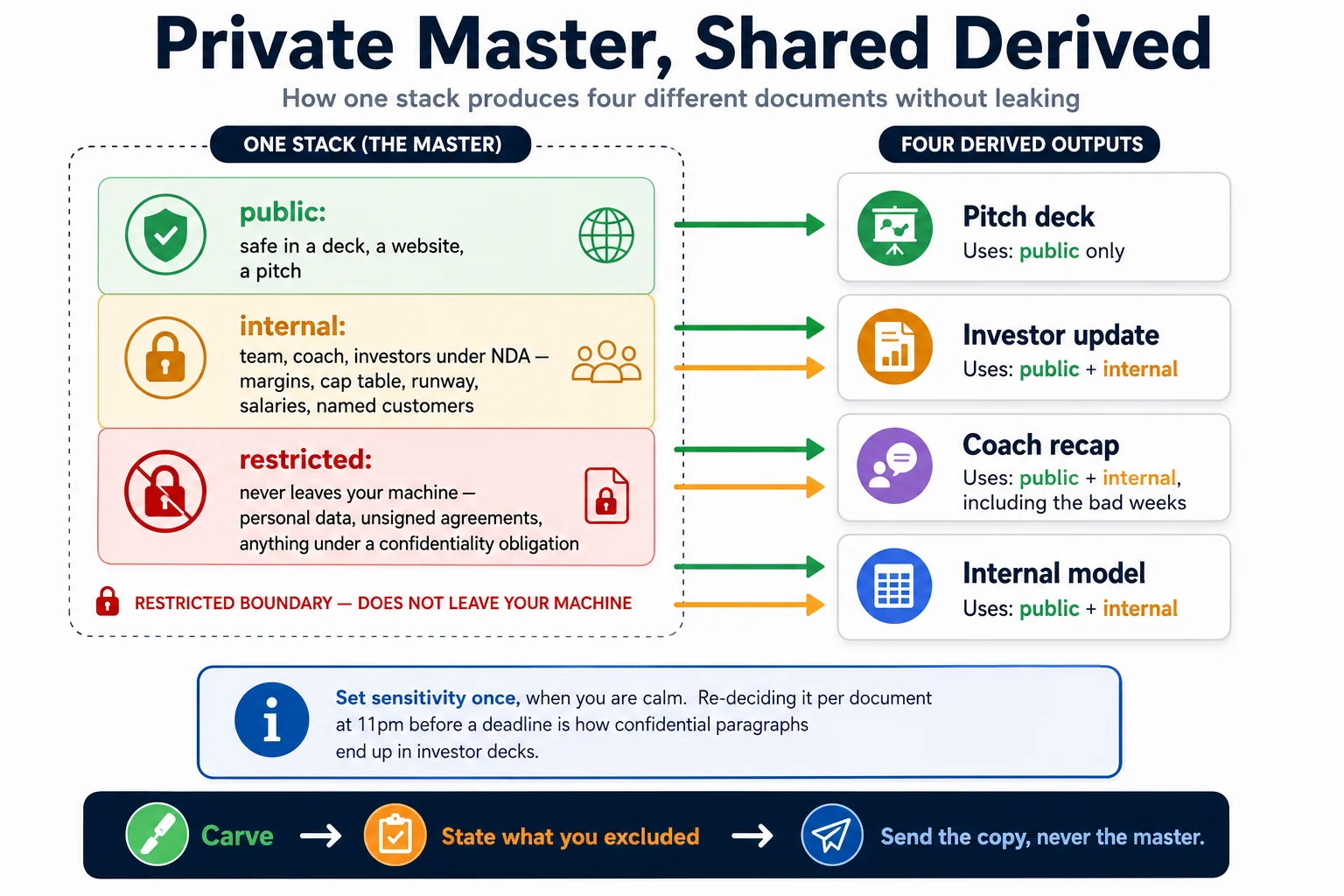
The four rules
1. Scope its access to one folder
Point the AI at a single, defined folder — your stack — not your Desktop, not your Documents, not your whole drive. It can only see and touch what you let it into.
Start narrow and widen only as you build confidence. There is no upside to giving a tool access to your tax returns so that it can write your pitch deck.
2. Watch what it does
Especially early on, keep an eye on the actions it takes. These tools ask before big changes when they are configured well — read those prompts, do not click through blindly.
The dangerous moment is not week one, when you are attentive. It is week six, when approval has become muscle memory and you approve a batch delete because it was the ninth dialog in five minutes.
3. Set guardrails before you widen the access
Most tools can be told what they may never do. Put those limits in place before you grant more freedom, not after something goes wrong:
- Never delete a file without explicit confirmation
- Never touch
_inbox/(source material is read-only) - Never modify past recaps in
stack/10-pulse/recaps/ - Never write outside the stack folder
AGENTS.md in this repo states these as rules for the model. That is necessary but not sufficient — a rule in a prompt is a strong suggestion, not a permission boundary. Where your tool offers real file permissions or an allow/deny list, use them.
4. Use git — it is the actual undo button
git init
git add -A && git commit -m "Before the AI touched anything"
Commit before every significant AI session. If a run goes badly:
git diff                 # exactly what changed
git checkout -- .        # throw it all away
This is the single highest-value five minutes in this entire repo. Everything else on this page reduces the chance of a bad outcome; this one makes a bad outcome recoverable. If git is genuinely not for you, at minimum copy the folder before each session, or keep it in a location with real version history.
What to keep out of the folder entirely
Some material should not be in an AI-readable folder at all, regardless of how well configured your tools are.
| Keep out | Why |
|---|---|
| Government ID numbers, passport scans, bank credentials | No upside; large downside |
| Employee personal files, medical information, grievances | Personal data. In many jurisdictions this carries specific legal duties. |
| Customer personal data at scale — full contact databases, patient records, user PII | If you must work with it, anonymise first. Names become Customer A. |
| Signed contracts under a confidentiality obligation | Read the NDA. Some prohibit processing by third-party services outright. |
| Anything a third party gave you in confidence | Their decision, not yours. |
If you need the AI to reason about sensitive material, give it the shape without the substance: "a customer list of 340 names across 3 cities, average order ₹2,400" is enough to plan with and contains nobody's phone number.
Writing about a named person
Skip this if you are a founder working on your own company. It matters to programmes running a portfolio, where the whole point of a coaching note is that it is about a particular person, and the escape hatch above — anonymise, Customer A — is not available.
The table says to keep employee files and grievances out, and that stands. A coaching record is a narrower thing, and it is legitimate to keep, but only under conditions:
Write it as though the subject will read it. In most jurisdictions they can ask to, and increasingly they do. This is not only compliance — a judgement you would not put in front of the person is usually a judgement you have not thought through.
Separate what happened from what you concluded. The record of a session is factual and belongs to both sides. Your read of the person is yours, and it is tagged [ASSESSMENT — name, date] so it is never mistaken for fact and never merged with somebody else's read.
Name an owner, a retention period and a deletion trigger before the first note exists, not after. Who answers if someone asks what is held about them. How long it is kept once they leave the programme. What is deleted then, and what is not.
Keep it proportionate. Notes on how a founder is progressing against their own goals are ordinary programme business. A running commentary on their personality is not, and it is the thing that will be read aloud back to you one day.
Whether any of this is lawful where you operate is not a question this page can answer, and the answer differs across the jurisdictions your coaches sit in. Ask before the first note, not after the hundredth.
The account you use matters
Business, team and enterprise plans, and API access, carry materially stronger data-handling terms than consumer plans — on most providers including a contractual commitment not to train on your data.
A paid consumer subscription is not the same thing. Several major providers use consumer-tier conversations for model improvement by default — on the paid personal tier as well as the free one — unless you turn it off in settings. Upgrading your personal plan buys you capacity, not a data guarantee.
You are putting your company's operating reality into this tool. Check which tier you are actually on, read its terms, and find the training toggle.
Data protection, briefly and non-legally
If you handle personal data — customers, employees, users — most jurisdictions now impose real duties on you: a lawful basis for processing, purpose limitation, retention limits, and often obligations when a processor is involved. India's DPDP Act, the GDPR, and equivalents elsewhere all bite at surprisingly small scale.
Two practical implications:
- A knowledge base built by AI-processing customer emails is a processing activity. It may be entirely lawful. It is not automatically lawful because it was convenient.
- Ask early, not after. A thirty-minute conversation with a lawyer, before you ingest your CRM export, is far cheaper than the alternative.
This page is not legal advice and cannot be. It exists so that you ask the question.
The caveat, plainly
When you give an AI more access, it can act quickly — and a wrong move can erase something for good. That is not a reason to avoid it. It is the reason to start small, keep backups, commit often, and grow the access only as fast as your confidence.
The founders who get hurt are not the cautious ones or the reckless ones. They are the ones who were cautious for two weeks and then stopped reading the dialogs.
Generated from docs/safety.md in the repository. Edit the markdown, not this page.