Reach another system safely
Use a connector with the minimum scope, start read-only, and preserve source evidence without granting hidden authority.
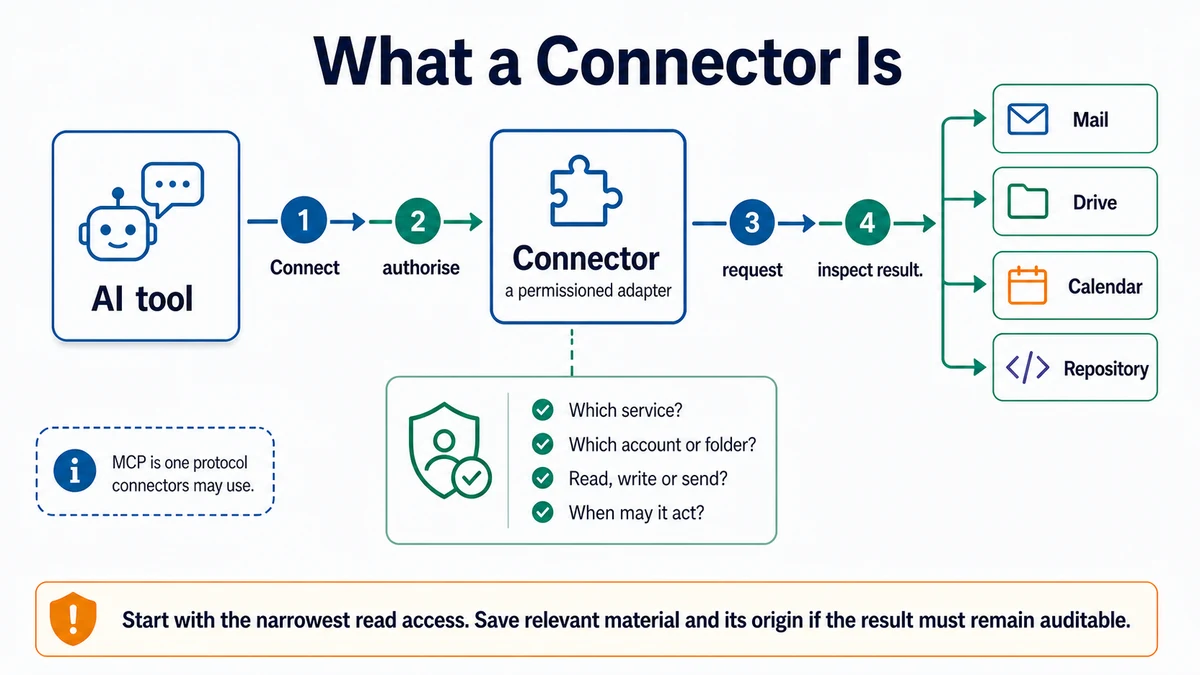
Requires: A named external system, a specific task, and an account you are authorized to use.
Done when: The connector has only the necessary scope, a read-only test has succeeded, and any external write remains separately approved.
Step 0 — Check the ground
Confirm who owns the external system and whether the data may enter the chosen AI surface. Stop if you are relying on someone else's account, participant data, confidential material, or unclear organizational permission.
A connector lets a tool access another system through an approved integration. It does not make every action in that system appropriate.
Steps
- Name the exact job. “Use my drive” is too broad. “Read the approved project brief and return its title and modified date” is testable.
- Separate capabilities:
- search or list;
- read;
- create;
- update;
- send or publish;
- delete or move;
- change permissions.
- Connect the narrowest account or workspace available. Review the provider's current authorization screen and organizational policy. Do not assume a label such as “read” covers every underlying permission.
- Run a harmless read-only test against a known item. Confirm the connector returned the intended account, source, and timestamp.
- Save useful findings into the project with provenance: source system, item title or stable identifier, and access or verification date. Do not copy more personal or confidential content than the project needs.
- Define any proposed external write separately:
Context: The connected system is [system/account]. The task is [task].
Allowed actions are [search/read only]. Disallowed actions are [writes,
sends, deletes, permission changes, and other limits].

Before using the connector, restate the exact scope and stopping condition.
Search only for [target]. Return the source identifier, title, relevant
finding, and access date. If a write would help, describe it as a proposal;
do not perform it. If identity or scope is ambiguous, stop.- Disconnect or reduce access when the task no longer needs it, using the product's current account controls.
Approval gate
A human reviews the exact target, payload, recipients or audience, and irreversible effects before any connector creates, edits, sends, publishes, deletes, moves, or changes access.
Verify
Check the connector record against the external system:
- correct account and workspace;
- correct source item;
- correct read result;
- no unintended write;
- no unnecessary sensitive content copied.
Save point
Save a short provenance note, not credentials or raw access tokens. If a finding becomes project input, link it to the decision or file it supports.
If it fails
- The wrong account appears: stop and disconnect before retrying.
- A source cannot be identified: do not use the finding as evidence.
- The connector lacks required permission: request the smallest missing scope; do not broaden access by default.
- The tool proposes a write during a read task: keep it as a proposal and add a separate approval step.
- Organizational policy is unclear: ask the account owner or administrator before connecting.