What an API call costs and exposes
Separate product subscriptions from API usage and keep provider credentials out of browser code, prompts, logs, and Git.
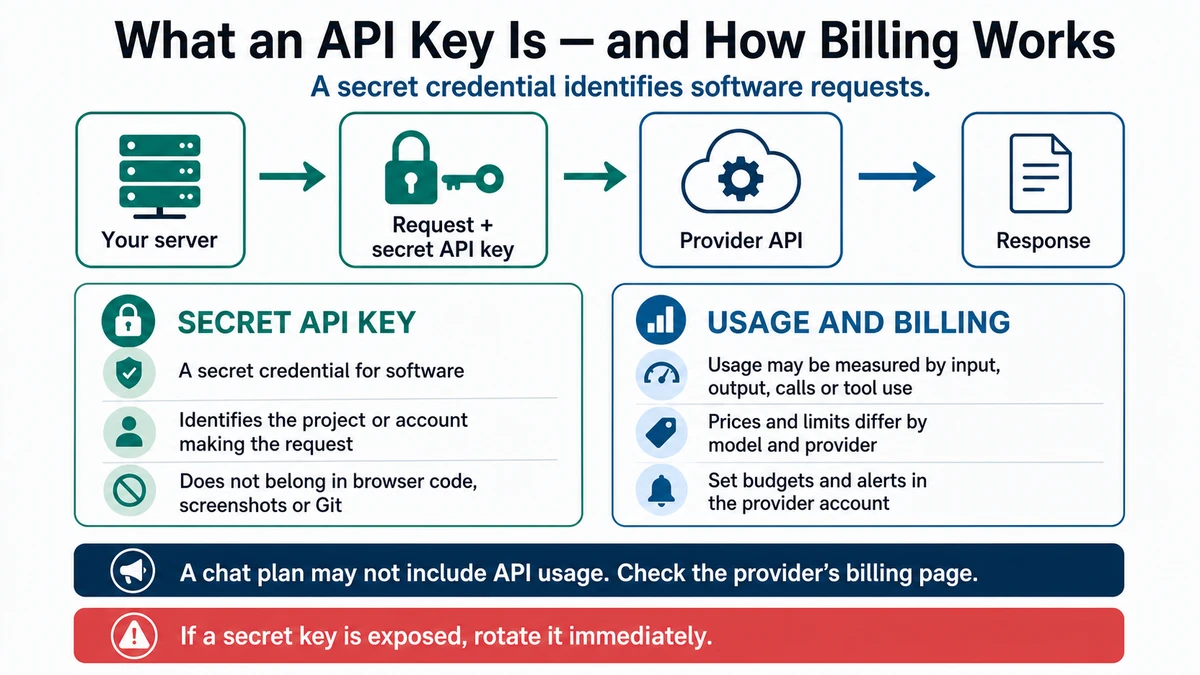
Requires: A named provider, a server-side use case, and access to that provider's current API and billing documentation.
Done when: You can identify the credential owner, storage location, calling environment, usage boundary, and current billing source without revealing a real key.
Step 0 — Check the ground
Do not create or paste a real key into a chat, lesson, issue, screenshot, terminal history example, or source file. First decide whether the feature truly needs programmatic API access.
An application programming interface, or API, lets one program make a structured request to another. An API key commonly authenticates the caller or project. Its exact privileges and billing scope are provider-specific.
Steps
- Separate the products. Access to a consumer chat or desktop subscription does not automatically mean API usage is included. Check the provider's current account and billing pages.
- Draw the safe call path:
browser → your server → provider API
                 ↑
          server-side secret
A secret key must not be embedded in public browser code. Some services also issue publishable or anonymous identifiers intended for clients; use only the classification and restrictions stated in that service's documentation.
- Create a credential record without the secret value:
| Field | Record |
|---|---|
| Provider and project | The account that owns usage |
| Credential class | Server-only, publishable, or other documented class |
| Local storage | Environment variable or approved secret manager |
| Preview and production storage | Platform environment settings |
| Allowed caller | Named server route, job, or function |
| Usage owner | Person who reviews usage and billing |
| Rotation/revocation route | Provider's current controls |
- Put only the variable name in examples:
MODEL_PROVIDER_API_KEY=replace_in_local_environmentKeep real values in an ignored local environment file or approved secret store. Commit an .env.example only when it contains placeholders.
- Set a project cost boundary using the controls the provider currently offers. Also add application-side limits appropriate to the feature, such as authentication, input bounds, request quotas, timeouts, and a maximum output size.
- Log enough to diagnose usage without logging secrets or unnecessary user content. Record request identifiers and usage metadata only when the provider and privacy policy permit it.
- Ask for a security and billing plan:
Context: My server-side feature is [feature]. It will call [provider/API].
The users are [users] and the expected request pattern is [pattern].

Do not request or display a real credential. Produce:
1. the browser-to-server-to-provider call path,
2. the documented credential class,
3. local, preview, and production variable names,
4. repository ignore and secret-scan checks,
5. authentication, input, rate, timeout, and output controls,
6. current usage and billing pages I must inspect,
7. a revoke-and-rotate recovery plan.

Mark any provider-specific detail that is not present in supplied official
documentation as "needs current documentation".
Approval gate
A human confirms the provider project, billing owner, current price source, spending controls, credential storage, data handling, and production call path before creating a key or enabling the feature.
Verify
- Search the tracked repository and generated client bundle for the variable name and known secret patterns.
- Confirm the browser calls your server, not the provider with a server secret.
- Make one controlled test call and inspect the provider's usage record.
- Revoke any credential that was exposed; deleting it from the latest file is not enough.
OpenAI's current authentication and model-usage sources are recorded in Sources.
Save point
Commit .env.example, ignore rules, server route, and security checks without a real credential. Record the provider project, variable names, owner, and verification date in a private operational system when appropriate.
If it fails
- A key entered Git: revoke it immediately, then remove it from working files and address repository history with the repository owner.
- A client bundle needs the key: move the call behind a server route.
- Usage appears under the wrong project: stop calls, inspect environment configuration, and rotate if scope is uncertain.
- Cost cannot be bounded: keep the feature disabled until ownership, usage controls, and monitoring are clear.
- You cannot tell whether a value is publishable: treat it as secret until the provider's official documentation says otherwise.