Read what the terminal will do
Read a terminal command's target and side effects before allowing it to inspect, install, change, or delete anything.
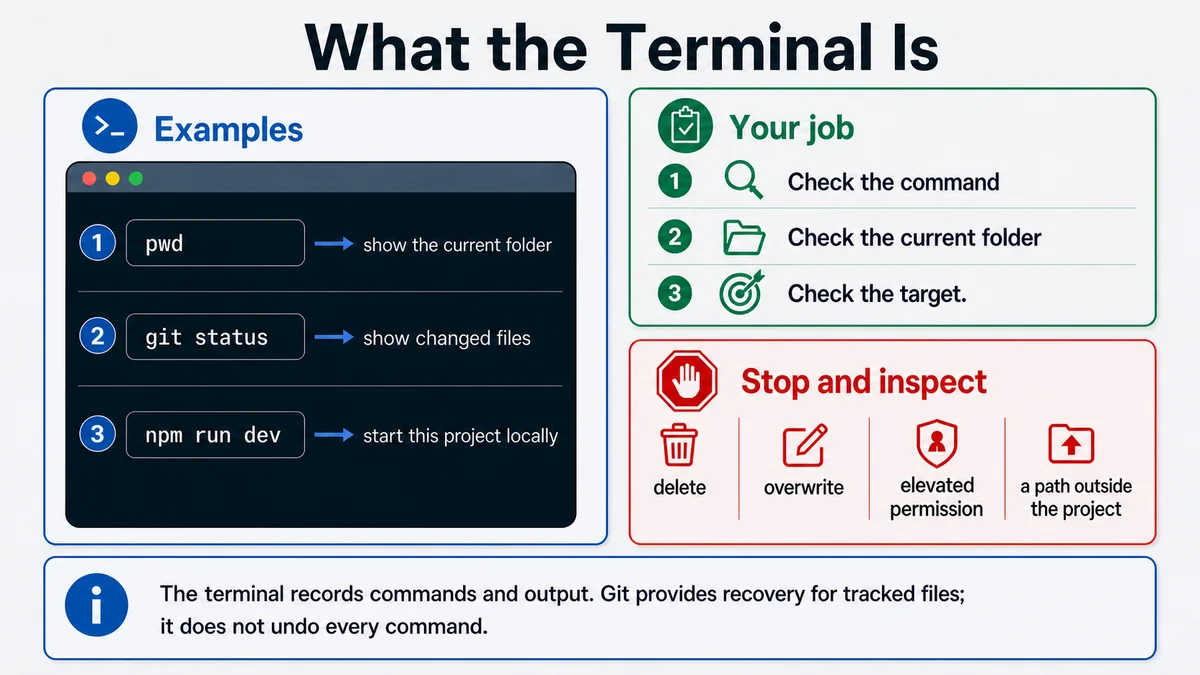
Requires: A terminal window and the exact project-folder path from Start here.
Done when: You can identify the current folder, explain each part of a proposed command, classify its side effects, and decide whether approval is required.
Step 0 — Check the ground
Do not paste a command you do not understand. First inspect the current folder:
pwdIn PowerShell, the equivalent check is:
Get-LocationStop if the path is not the intended project. Pay particular attention to your home folder, Desktop, workspace roots, parent-directory references such as .., and absolute paths.
Steps
- Read the prompt and path. The terminal runs commands in a current working directory unless the command names another target.
- Split a command into:
- the program, such as
git; - a subcommand, such as
status; - options or flags, such as
--short; - targets, such as a filename or branch;
- operators that combine or redirect commands.
- the program, such as
- Classify the action:
| Class | Examples | Review |
|---|---|---|
| Inspect | pwd, git status, git diff | Confirm target; normally reversible because nothing changes. |
| Generate or test | a project build or test script | Confirm outputs, time, and whether generated files change. |
| Install or edit | package install, formatter, file write | Inspect package manager, files, and lockfile impact. |
| Record or external write | commit, push, deploy, send | Confirm payload and destination. |
| Destructive or privileged | deletion, reset, migration, permission change | Require an explicit human gate and recovery plan. |
- Treat shell operators as part of the command. Pipes, redirects, command substitution, globs, and chained commands can change the real effect. If you cannot explain them, ask for separate commands.
- Ask for a command review:
Context: My intended project folder is [exact path]. Review this command:
[command]

Do not run it. Explain:
1. the program, flags, targets, operators, and resolved working folder,
2. files, packages, processes, accounts, or remote systems it may change,
3. whether it is inspect-only, reversible, external, destructive, or
   privileged,
4. the safest preflight and preview command,
5. how to verify success,
6. how to recover if it fails.

If any target depends on a variable, wildcard, or parent path, call it out.- Run one command at a time when learning or when the effect matters. Read the result before continuing.
Approval gate
A human explicitly approves commands that install packages, overwrite files, discard changes, delete data, alter permissions, run migrations, write to an external system, incur cost, or deploy. The approval names the exact command and target.
Verify
Before a command, say:
- my current folder is …;
- this program will …;
- its target is …;
- it may change …;
- success will be checked by …;
- recovery is ….
After the command, inspect the exit output, git status, and the affected system.
Save point
Commit a passing project state before a risky change. Save important command output in a review note, but remove secrets, tokens, private URLs, and personal data.
If it fails
- The current path is wrong: stop and change to the intended folder; do not “fix” the command by adding a broad target.
- The command contains an unexplained flag or operator: open the program's official help or documentation.
- A process keeps running: use the terminal's normal interrupt control, then inspect state before retrying.
- Files changed unexpectedly: stop, inspect
git statusandgit diff, and decide what to keep before restoring anything. - A destructive command already ran: do not run more cleanup commands. Preserve logs and seek recovery for the exact system affected.