Secrets and environment variables
Classify configuration by exposure and place real values safely in local, preview, and production environments without committing them.
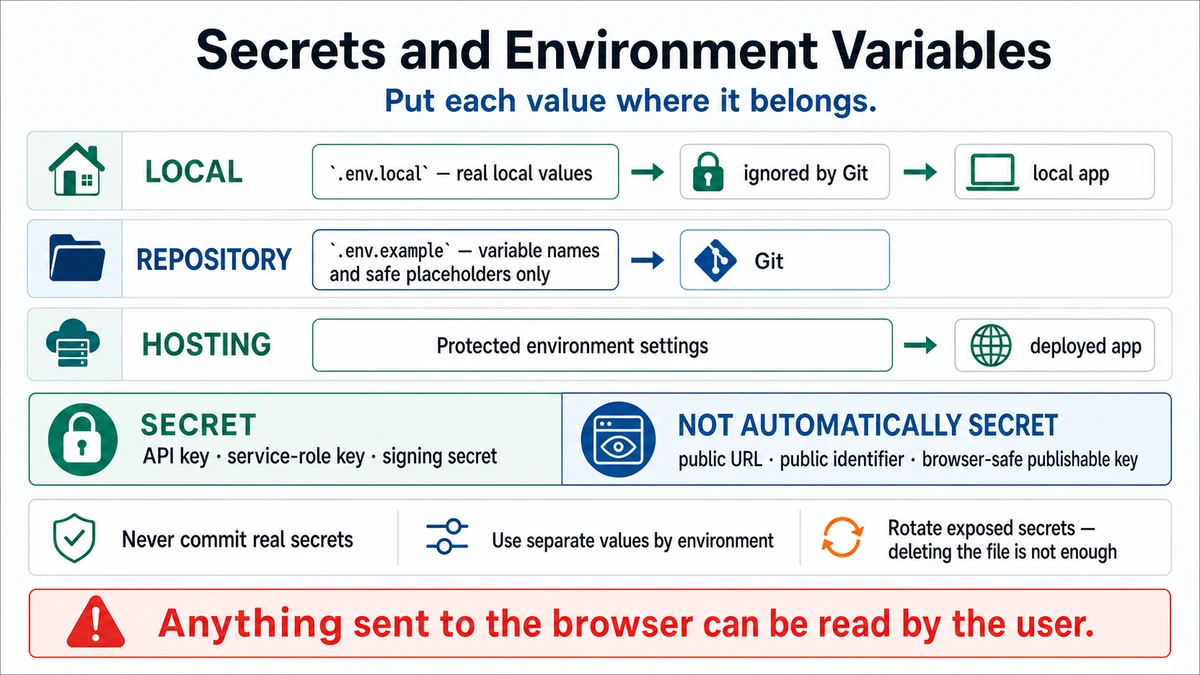
Requires: A list of configuration values the project expects and the code locations that read them.
Done when: Every value is classified, only placeholders are committed, real values live in the intended environment, and secret-leak checks pass.
Step 0 — Check the ground
Stop before copying a key. Identify what it authorizes, who owns it, whether it is meant for browser exposure, which environment needs it, and how to revoke it.
Prepare the configuration
- Inventory names from the environment schema,
.env.example, source reads, deployment settings, and provider dashboards. - Classify each:
- Public identifier/publishable key: may reach the browser, but still needs server/database authorization behind it.
- Server-only secret: grants an application capability and must never enter client-delivered code.
- Privileged/admin secret: bypasses ordinary user controls; minimize its use and access.
Context: Inspect environment schemas, .env.example, ignore rules, source reads,
and deployment documentation. Never print or repeat any value.

Produce a table of variable name, purpose, read location, exposure class
(browser-publishable / server-only / privileged), required environments,
owner, failure when absent, and revocation source. Flag public prefixes on
secret values and source-code fallbacks that look credential-like. Do not edit
or create values.
Approval gate
The system owner approves who may access each secret and where it will be stored. A reviewer approves any privileged key and the code path that uses it. Production value changes require explicit production approval.
Steps
- Commit
.env.examplewith unmistakable placeholders and purpose comments. Do not put a real-looking value in an example. - Store local values in the project's ignored
.env.local. Confirm withgit check-ignore .env.localandgit status. - Enter preview and production values in the hosting platform's environment settings only for the separately approved environments. Keep environments separate when their data or permissions should be separate.
- Ensure client code reads only values intentionally exposed by the framework. A server secret with a public/client prefix is a leak.
- Redact values from prompts, screenshots, logs, fixtures, error reports, and shell history where possible.
- Before every push, search tracked files and inspect the diff. If a real secret was committed, revoke/rotate it first. GitHub's sensitive-data guidance explains that removing it from current source is not enough, history cleanup has broad side effects, and rotation should happen first.
Verify
- Only
.env.exampleplaceholders are tracked. - Local real env files are ignored.
- Browser bundles/requests contain only intentionally publishable values.
- Preview and production use the intended accounts/projects.
- The app fails clearly when required configuration is absent.
- Every secret has an owner and revocation route.
Save point
Commit schema, example names, validation, and documentation without values. Record dashboard changes by variable name, environment, owner, and date—not the secret.
If this fails
- A secret was committed: revoke/rotate immediately, then follow the reviewed GitHub sensitive-data procedure and coordinate with collaborators.
- A public key is mistaken for authorization: add RLS/server permission checks; public does not mean unrestricted.
- Local works but production does not: compare names, scopes, build-time versus runtime use, and redeploy requirements without printing values.
- No one knows what a key grants: leave it unset and consult the provider's primary documentation.