Give the AI usable material
Prepare readable Markdown, predictable filenames, useful image alternatives, and relative paths that survive a build and deploy.
Requires: A project source folder containing text or images you are allowed to use.
Done when: The source inventory has stable names, readable text, working relative links, useful image alt text, and explicit gaps instead of invented content.
Step 0 — Check the ground
Make a copy or Git save point before renaming or moving assets. Stop if rights, ownership, intended audience, or the authoritative version of a source file is unclear.
Steps
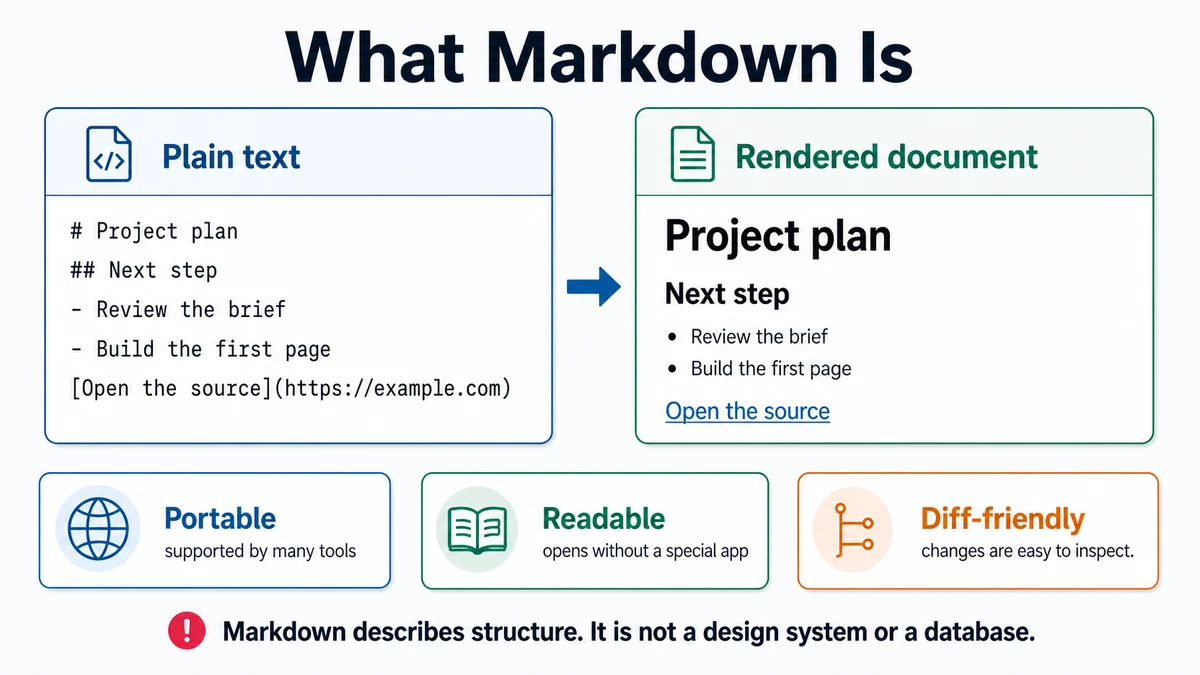
- Use Markdown for structured plain text:
# Page title
A short opening paragraph.
## Section
- One item
- Another item
[Descriptive link text](https://example.com/)
- Give each page one clear top-level heading. Use heading levels in order and link text that describes the destination.
- Prefer predictable filenames: lowercase words separated by hyphens, a meaningful extension, and no accidental duplicate suffixes. Do not rename merely for style if existing code already depends on the path.
- Understand relative paths:
image.webpmeans the current folder.images/image.webpmeans a child folder.../image.webpmeans the parent folder./image.webpbegins at the site's configured root and can behave differently under a subpath.
- Write alternative text for the image's purpose in context. Decorative images can use an intentionally empty alt value when the site's implementation supports that choice. Do not repeat “image of” unless the medium itself matters.
- Build an asset inventory:
| Current path | Intended use | Rights/source | Required treatment | Gap |
|---|---|---|---|---|
... | Hero, proof, logo, diagram | Owner or source | Crop, compress, caption, none | Missing detail |
- Keep source truth separate from generated copy. If a price, name, testimonial, link, or claim is absent, mark the gap and name who can supply it.
- Ask for a read-only source audit:
Context: These files are candidate source material for [project]. The
intended audience and page goal are [details].

Inspect only. Do not rename, move, convert, compress, rewrite, or generate
files. Produce:
- a file inventory with path and type,
- likely duplicates or unreadable files,
- exact text and links available,
- image dimensions only when directly inspectable,
- rights or provenance information supplied,
- missing content and decisions,
- a proposed stable filename and destination for each accepted asset.

Do not invent claims, captions, testimonials, prices, or rights.
Approval gate
A human approves publishing rights, authoritative copy, proposed renames, crops, conversions, alt text, and destination paths before assets are changed or made public.
Verify
- Open every local link and image from the built page.
- Check filename case on a case-sensitive build environment.
- Read headings without styling; the outline should still make sense.
- Turn images off or use an accessibility inspector; necessary meaning remains available.
- Search for placeholders and unresolved gaps before release.
Save point
Commit source-text changes and intentional asset changes in a reviewable milestone. Preserve original high-quality assets or their provenance outside generated output when the project needs future edits.
If it fails
- A link works locally but not after deploy: check case, relative path, configured base path, and whether the asset was included in the build.
- An image is too large: keep the original, create a web derivative, and verify quality at its rendered size.
- Text cannot be extracted reliably: ask the source owner for an accessible original rather than guessing.
- Two files conflict: surface both versions and request an authoritative choice.
- The model invents missing copy: remove it and restore an explicit gap.