Connect Supabase
Configure Supabase locally without tracking secrets, review the starter migrations, and prove auth/database plumbing before product schema work.
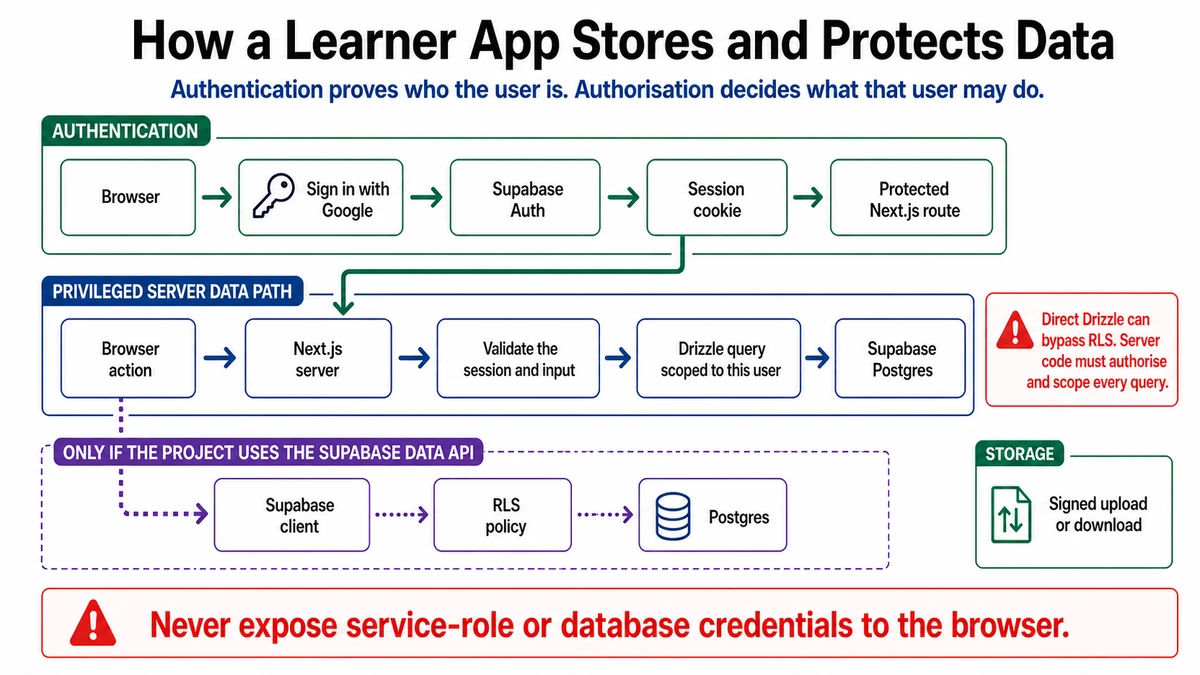
Requires: A learner-owned Supabase project, authority to change it, the clean starter shell, and a local .env.local that Git ignores.
Done when: Required local configuration works, starter migrations and the profile trigger are inspected and applied with approval, the health route connects, a test signup creates a profile, and Git contains no secret.
Step 0 — Check the ground
Read the pinned starter's environment guide and database guide. Stop if you are using someone else's project, a production database with data, or a value copied from an untrusted message.
Prepare the connection
- Inspect
.env.example, the environment schema,.gitignore, Drizzle configuration, and every existing migration without creating values or changing Supabase. - Record schemas, tables, policies, triggers, buckets, and privileges the migrations would change.
- Identify the exact development project, backup/recovery route, and owner.
Context: Inspect the pinned starter's environment schema, .env.example,
.gitignore, Drizzle configuration, and migration files. Do not reveal values
and do not apply a migration.

Produce:
- required local variables classified as browser-publishable, server-only, or
  privileged;
- every database object and privilege the existing migrations will change;
- a pre-migration backup/recovery check;
- post-migration health, profile-trigger, and secret-leak checks.

Stop for human approval before any database mutation.
Approval gate
The project owner confirms the Supabase project and environment. A reviewer reads the migration SQL and approves its target, effects, recovery route, and command. Migration is a consequential external write. Do not create configuration values, change the dashboard, or run the migration until this gate passes.
Steps
- Run
bun run setupand inspect.env.local. Confirm Git ignores it. - Add the required Supabase project URL and browser publishable/anon key to the names expected by the pinned environment schema. These are exposed to browser code and rely on RLS; they are not a replacement for authorization.
- Add
DATABASE_URLonly to the server environment. It is privileged and must never use aNEXT_PUBLIC_name or enter client code. - Do not add the service-role key unless an approved retained feature needs it. It is privileged, server-only configuration.
- Run the setup/config doctor again without pasting its values into chat or screenshots.
- Back up or use the approved disposable development project, then run the reviewed
bun run db:migratecommand. - Start the app. Check
/api/health, create a test account using the existing email route, follow its verification behavior, and confirm the related profile appears. - Inspect
git status,git diff, and tracked files for secret values.
Verify
.env.localis ignored; no real value appears in Git, logs, prompts, or browser-delivered source except intended publishable values.- The health route reports the expected connection without exposing a connection string.
- Signup/auth callback behavior is understood.
- A new auth user receives the expected profile record.
- Existing starter schema is recorded before product schema changes.
Save point
Commit only reviewed source or documentation changes. Environment values and dashboard state stay outside Git. Record the migration and verification date in todos.md.
If this fails
- The database URL fails: re-copy it from the project settings and check whether the intended connection mode matches the command; do not print it.
- Migration partially applies: stop further commands, preserve the log, and inspect migration state before retrying.
- Profile is missing: inspect the custom trigger migration and auth event; do not insert a permanent manual workaround.
- A secret enters Git: revoke/rotate it first, then remove it from tracked history with review.